In this document
The short answer
After a Google Ads account transfer, check the customer ID, your accepted access, the manager relationships and the agreed billing arrangement. Confirm any advertiser-verification work and included assets before acknowledging completion or making campaign changes.
Check a Google Ads account handover
Verify the account and agreed responsibilities after accepting the proposed access.
Open the agreed customer ID
Sign in with your receiving Google Account and verify the account identifier in the handover agreement.
Confirm accepted access
Check that your user invitation or manager link is accepted and that the agreed permissions are present.
Review users and managers
Identify the authorised access that remains and resolve any difference from the agreed scope.
Confirm billing and advertiser tasks
Check the payer arrangement and any required truthful advertiser-information updates before authorising spend.
Record acceptance or discrepancies
Confirm completion in the transaction discussion, or describe the exact unresolved issue before continuing.
Verify the account in your own session
Sign in with the receiving Google Account and open the customer ID identified in the agreement. If several accounts appear in your selector, use the ID rather than relying on a similar account name. Confirm that the invitation or MCC link has been accepted, rather than merely sent.
Keep the commercial discussion open while you check. A screenshot supplied by another party is useful context, but your own session confirms what your team can currently access. Record any mismatch clearly instead of assuming it will correct itself later.
Check the permissions you agreed to receive
Review users and managers against the written scope. A direct user role and a manager relationship provide different routes into the account. The agreed administrative rights should be visible; the fact that you can see campaign reports is not, by itself, sufficient.
Identify authorised users and managers that need to remain. Remove obsolete access only through the appropriate administrator and agreed sequence. Keep enough authorised administration available to manage the account and related tags responsibly.
- Correct receiving Google Account or MCC.
- Accepted access rather than a pending invitation.
- The agreed role and manager permissions.
- An understood list of users and managers that will remain.
Confirm billing and advertiser information separately
Clarify who is responsible for advertising costs from the agreed handover point. Check the billing arrangement without presuming that an account invitation changed the payments profile. If a supported billing transfer is required, verify its status before authorising spend.
The advertiser must be represented accurately. Google may require a supported update or verification process when business identity or ownership changes. Do not reuse someone else’s identity documents or assume an earlier verification covers the new advertiser.
Review campaigns and connected assets before launch
Check which campaigns, conversion actions and linked properties were included. Establish whether existing campaigns should remain paused during your review. An account handover does not prove that the campaign copy, website, targeting or measurement is suitable for your business.
Inspect the current notifications and agree how an unexpected discrepancy will be handled. Keep the account purchase price, advertising budget and any separate campaign-management service distinct. Only approve campaign changes after the relevant owner and responsibilities are clear.
Keep a short record of your acceptance checks
Record the account ID, receiving user or MCC, the access you confirmed and any remaining step in the transaction conversation. If a permission is missing, describe the task you cannot perform and show the relevant screen with unrelated personal information obscured. This makes the issue easier to distinguish from a campaign question or a billing request.
Close the handover only when the agreed checks have been addressed. For your own team, note who will manage users, billing questions and campaign changes from that point. Keep this operational record separate from any assumption about future ad approval or campaign results.
What the account interface can show
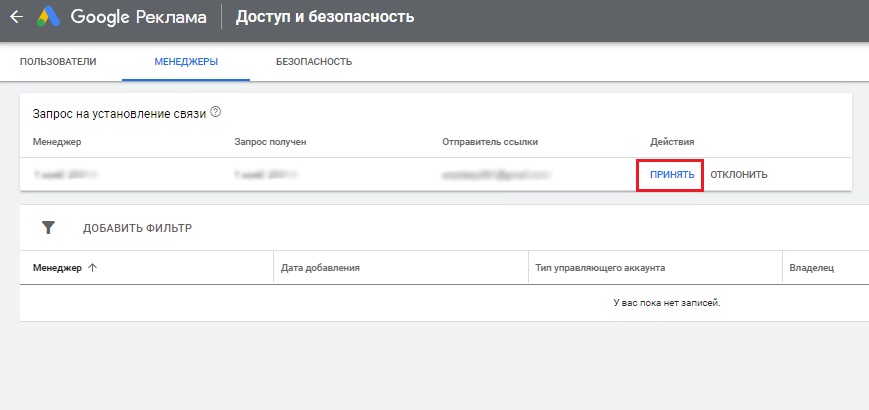
Confirm the resulting relationship from the receiving side, alongside the agreed direct-user role.
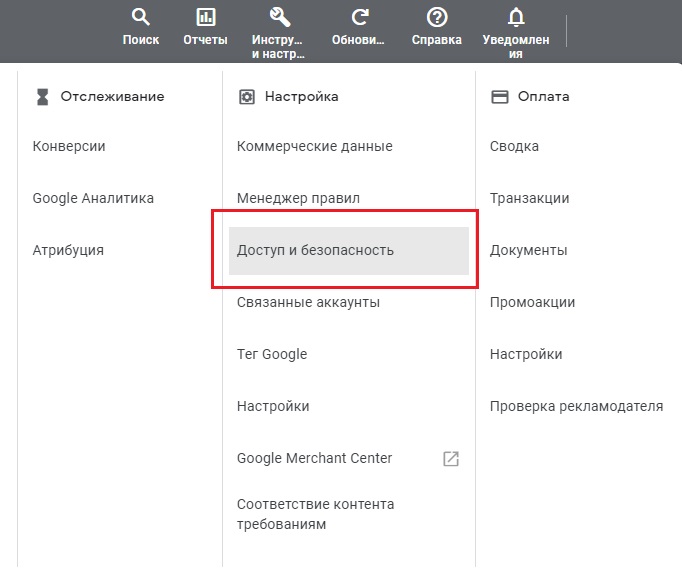
A user role does not by itself establish who controls the payment profile.
Questions, answered
Is a pending invitation enough to complete the transfer?
No. Verify accepted access to the correct account in your own signed-in session and check the permissions agreed for the handover.
Can I launch the old campaigns immediately?
Review their destinations, targeting, budgets and measurement first. Confirm that the advertiser and billing setup are accurate before authorising activity.
Does account access include the payments profile?
Not necessarily. Google Ads access and payments-profile permissions must be checked separately.
What should I send if the handover is incomplete?
Send the relevant customer ID, a description of the missing permission or step, and a redacted screenshot to the Telegram conversation for your transaction.
Official references
Follow the next question
Discuss the account, not assumptions
Send your question or the selected account to @gogoaccs. Confirm the facts, price and agreed rights before any transaction.